MAG and STB Box IPTV Setup Guide
Connect your MAG or STB box to HoxyTV: add the portal under System settings, Servers, Portals, then restart the portal.
Last updated
In short: HoxyTV on MAG/STB
On the MAG box, open System settings > Servers > Portals, enter HoxyTV as the portal name and the Portal URL from your welcome email, then return to System settings and choose Restart portal. The box must be the one whose MAC address you gave at checkout.
What You'll Need
- A MAG box, or another STB that takes a portal URL
- The Portal URL from your HoxyTV welcome email
- The box whose MAC address you gave at checkout (it is printed on the sticker underneath)
- An internet connection, wired if you can
Setup steps
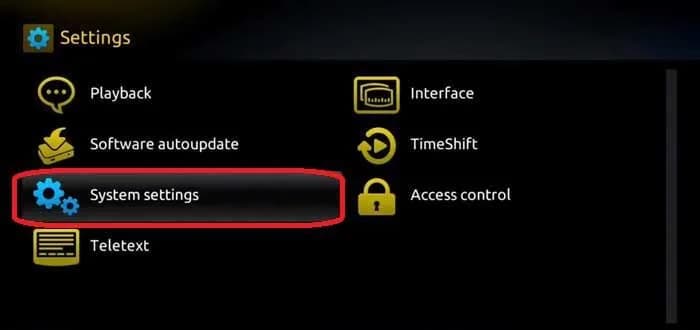
Step 1: Launch System settings
- From the main menu of the box, go to Settings, then System settings.
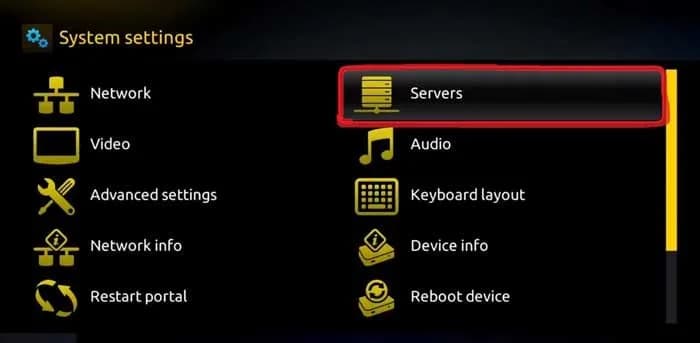
Step 2: Navigate to Servers, then Portals
- Select Servers.
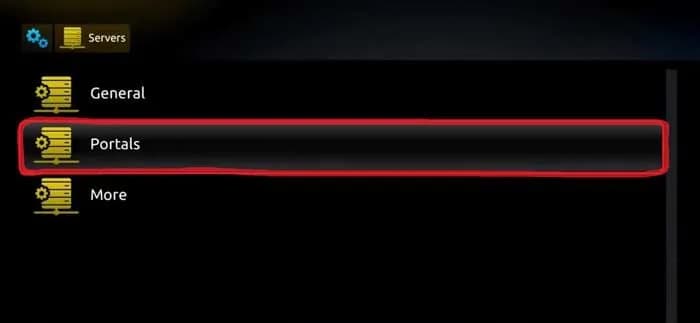
- Select Portals.
Step 3: Enter the HoxyTV portal
- Type HoxyTV as the Portal 1 name.
- Type the Portal URL into Portal 1 URL, character for character as in your welcome email.
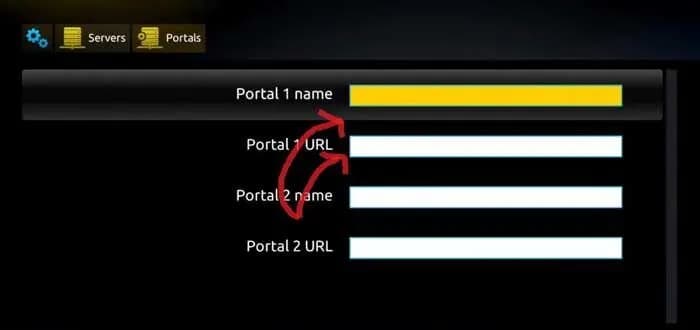
- Press OK to save it.
Step 4: Restart the portal
- Return to System settings and choose Restart portal.
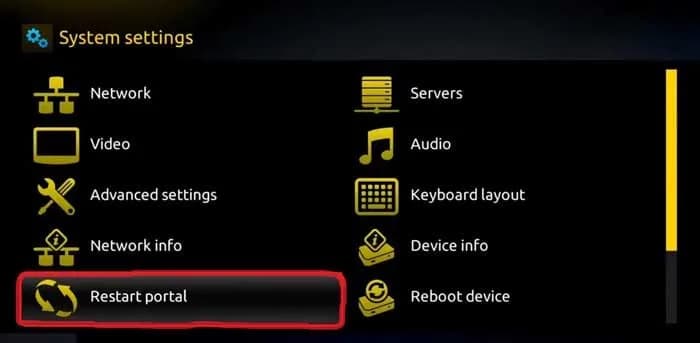
- The HoxyTV portal opens with your channel list.
You're All Set!
Your MAG box now plays HoxyTV. If something is not right, the answers below cover the usual fixes.
Troubleshooting on MAG/STB
The box says it is blocked, or shows no channels. Why?
Your subscription is tied to the MAC address you gave at checkout. Check it against the sticker under the box and the MAC address in your welcome email. If they do not match, message our support team with your order number.
The box hangs while loading the portal. What should I check?
Make sure the box is online (Settings > Network) and that the Portal URL matches your welcome email exactly, from the http:// at the start to the /c/ at the end.
Channels keep buffering or freezing. What helps?
Buffering nearly always comes from the internet connection, not the app. Plug the box into your router with a network cable where you can. Switching the router and the device off and on again helps too, and 4K needs a steady 25 Mbps or more.
Don't have HoxyTV yet?
Choose a plan and your login details reach your inbox right after payment: 30,000+ live channels, 100,000+ movies and shows, and setup help day and night.