LG Smart TV IPTV Setup Guide
Watch HoxyTV on an LG smart TV: install Hot Player or IBO Player Pro from the LG Content Store and link your playlist on the player's website.
Last updated
In short: HoxyTV on LG TV
Install Hot Player or IBO Player Pro from the LG Content Store and open it. Hot Player displays a MAC address; IBO Player Pro displays a MAC address and a device key. Use them to log in at hotplayer.app/upload or iboplayer.com/device/login from a phone or computer, add your HoxyTV M3U URL, then reopen the app on the TV.
What You'll Need
- An LG smart TV
- The M3U URL from your HoxyTV welcome email
- A phone or computer to open the player's website
- Internet of at least 15 Mbps for HD, or 25 Mbps for 4K
Players for LG TV
| Player | Where to get it | Adding your playlist |
|---|---|---|
| Hot Player | LG Content Store | Log in at hotplayer.app/upload with the MAC address on your screen |
| IBO Player Pro | LG Content Store | Log in at iboplayer.com/device/login with the MAC address and device key on your screen |
Setup steps
Step 1: Install an IPTV player
- Press Home and open the LG Content Store (newer TVs call it Apps).
- Find Hot Player or IBO Player Pro with the search and choose Install.
Step 2, option 1: Configure Hot Player
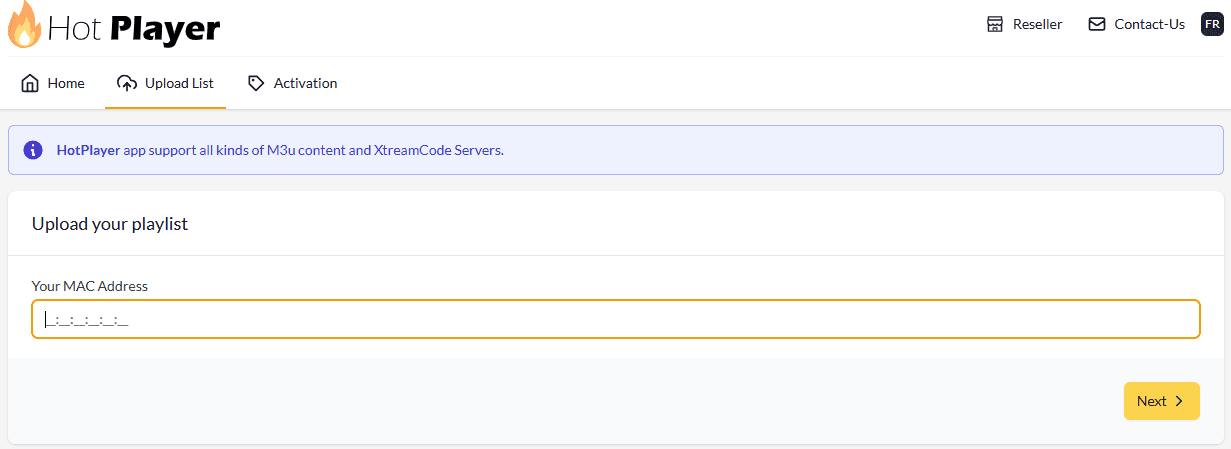
- Launch Hot Player on your LG TV. Its first screen shows a MAC address: keep it in view.
- From a phone or computer, visit hotplayer.app/upload and log in with that MAC address.
- Under Source, keep Link and paste the M3U URL from your welcome email. Prefer Xtream Code? Pick it and fill in your Username, Password and URL + PORT instead.
- Set Playlist name to HoxyTV.
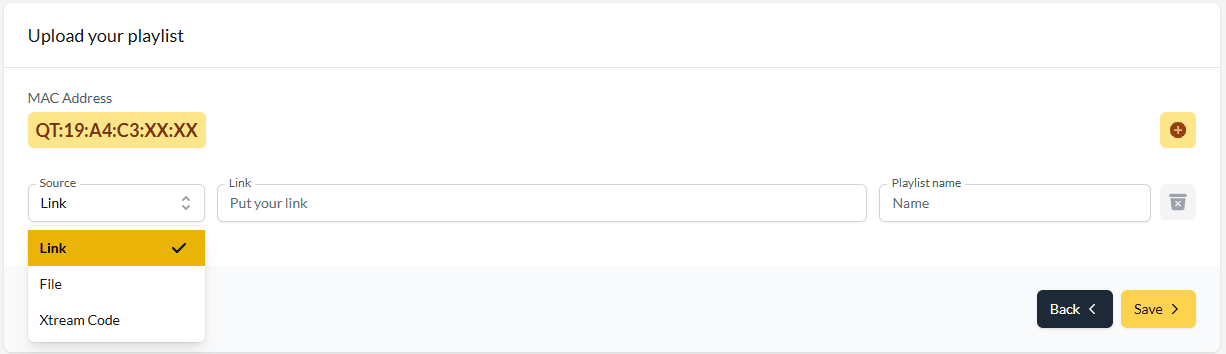
- Click Save, then close and reopen Hot Player on the LG TV to load your channels.
Step 2, option 2: Configure IBO Player Pro
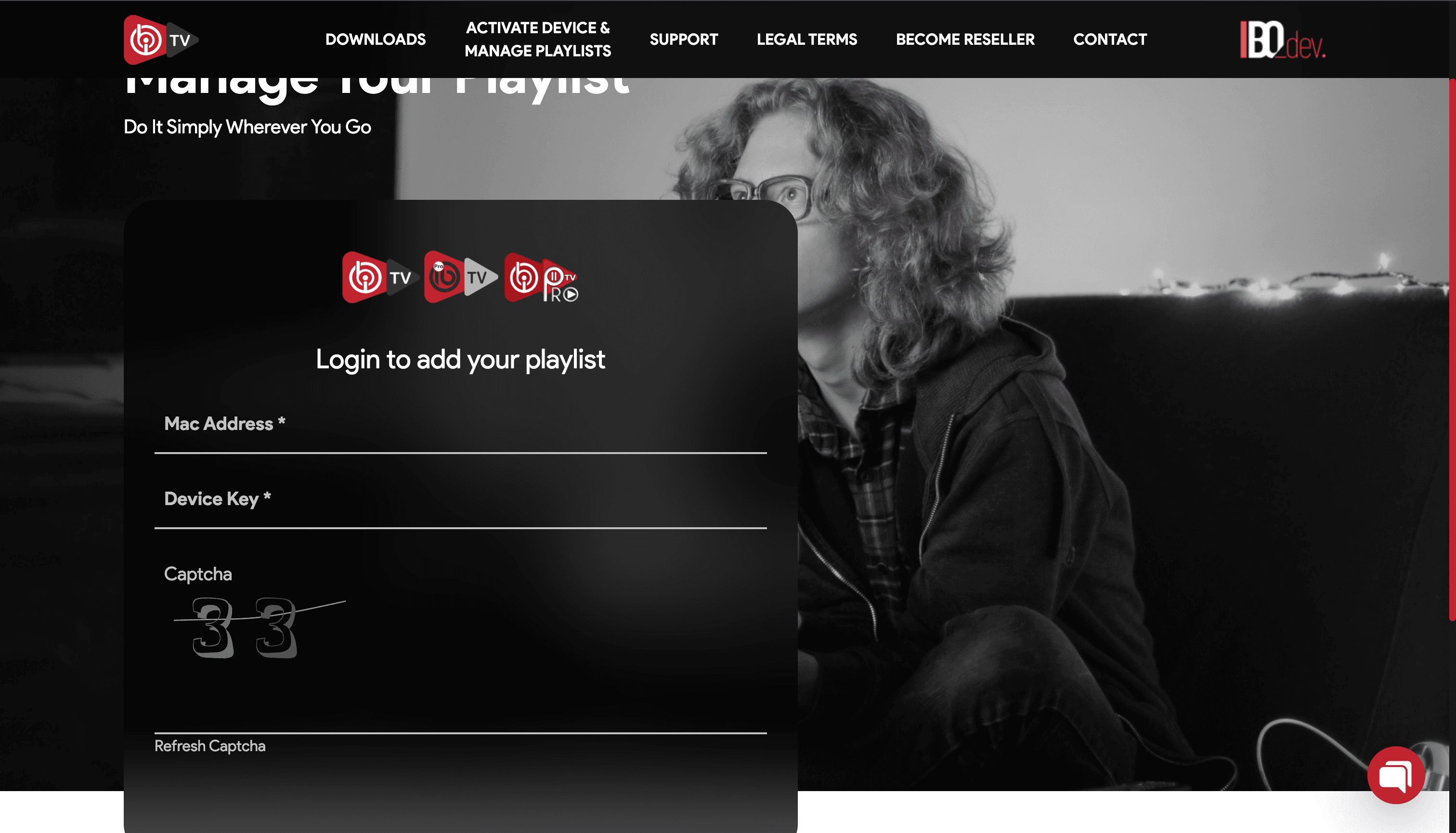
- Launch IBO Player Pro on your LG TV. It shows two things you need: a MAC address and a device key.
- From a phone or computer, visit iboplayer.com/device/login, enter both and solve the captcha.
- Click Add playlist, set Playlist name to HoxyTV and put your M3U URL in Playlist URL.
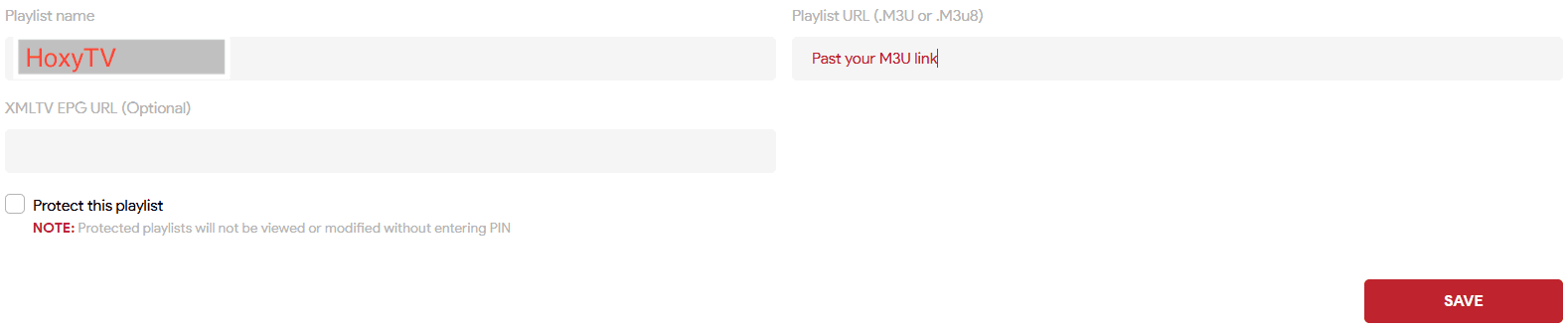
- Click Save, then close and reopen IBO Player Pro on the LG TV.
You're All Set!
Your LG TV now plays HoxyTV. If something is not right, the answers below cover the usual fixes.
Troubleshooting on LG TV
Can an LG TV install APK files?
No. LG TVs run webOS rather than Android, so apps come only from the LG Content Store.
My playlist shows no channels or fails to load. How do I fix it?
Copy the M3U URL from your welcome email again, all of it, and paste it once more. Make sure you logged in with the MAC address on your screen (and for IBO Player Pro, its device key too), then reopen the app. Still empty? Message our support team.
Channels keep buffering or freezing. What helps?
Buffering nearly always comes from the internet connection, not the app. A network cable or 5 GHz Wi-Fi to the TV helps most. Switching the router and the device off and on again helps too, and 4K needs a steady 25 Mbps or more.
Don't have HoxyTV yet?
Choose a plan and your login details reach your inbox right after payment: 30,000+ live channels, 100,000+ movies and shows, and setup help day and night.