Android IPTV Setup Guide for Phones, Tablets and TV Boxes
Get HoxyTV on an Android phone, tablet or TV box: install Hot Player or IBO Player Pro from its official site, then link your playlist on the player's website.
Last updated
In short: HoxyTV on Android
Let your browser install apps, then download Hot Player from hotplayer.app or IBO Player Pro from iboplayer.com and install the APK. Open the player and note the MAC address it shows (IBO Player Pro adds a device key), then log in with it on the player's website and paste your HoxyTV M3U URL.
What You'll Need
- An Android phone, tablet or Android TV box
- The M3U URL from your HoxyTV welcome email
- Internet of at least 15 Mbps for HD, or 25 Mbps for 4K
Players for Android
| Player | Where to get it | Adding your playlist |
|---|---|---|
| Hot Player | APK from hotplayer.app | Log in at hotplayer.app/upload with the MAC address on your screen |
| IBO Player Pro | APK from iboplayer.com/downloads | Log in at iboplayer.com/device/login with the MAC address and device key on your screen |
Setup steps
Step 1: Allow app installs from your browser
- In Settings, search for Install unknown apps. Most phones keep it under Apps > Special app access; some put it under Security.
- Pick the browser you download with, such as Chrome, and switch on Allow from this source. Older Android versions have a single Unknown sources switch under Security instead.
Step 2: Download an IPTV player
- Get the APK for Hot Player or IBO Player Pro from its official site.
- Find the .apk file in your Downloads folder, tap it and choose Install.
- Android TV boxes can use the Downloader app too, with the codes from the Fire TV tutorial: 395800 for Hot Player and 923441 for IBO Player Pro.
Step 3, option 1: Configure Hot Player
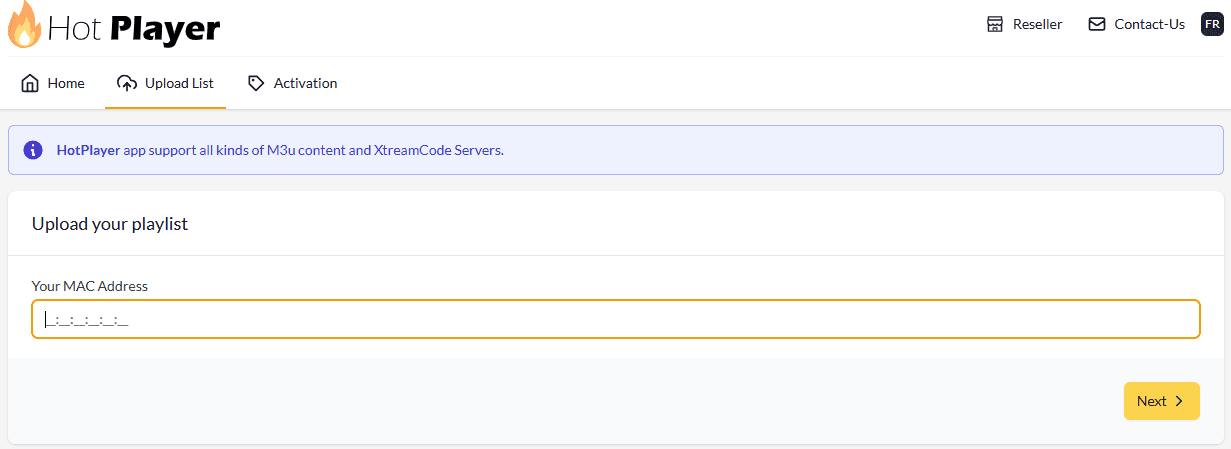
- Launch Hot Player on your Android device. Its first screen shows a MAC address: keep it in view.
- From a phone or computer, visit hotplayer.app/upload and log in with that MAC address.
- Under Source, keep Link and paste the M3U URL from your welcome email. Prefer Xtream Code? Pick it and fill in your Username, Password and URL + PORT instead.
- Set Playlist name to HoxyTV.
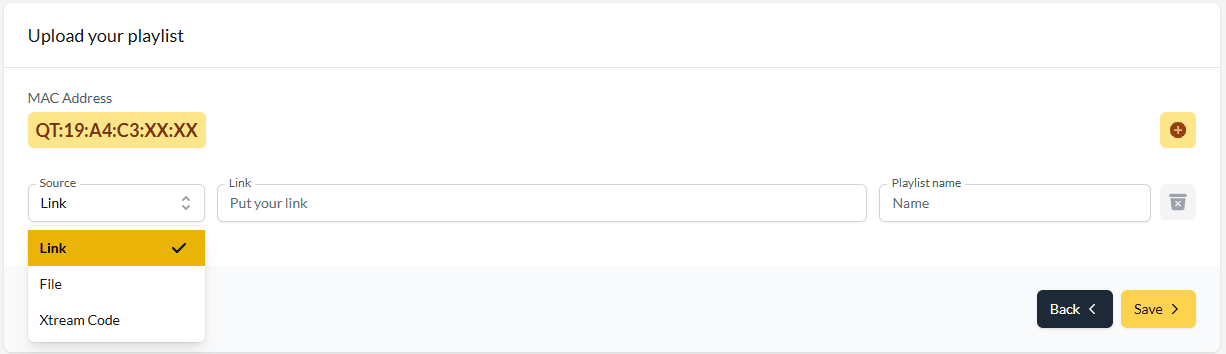
- Click Save, then close and reopen Hot Player on the Android device to load your channels.
Step 3, option 2: Configure IBO Player Pro
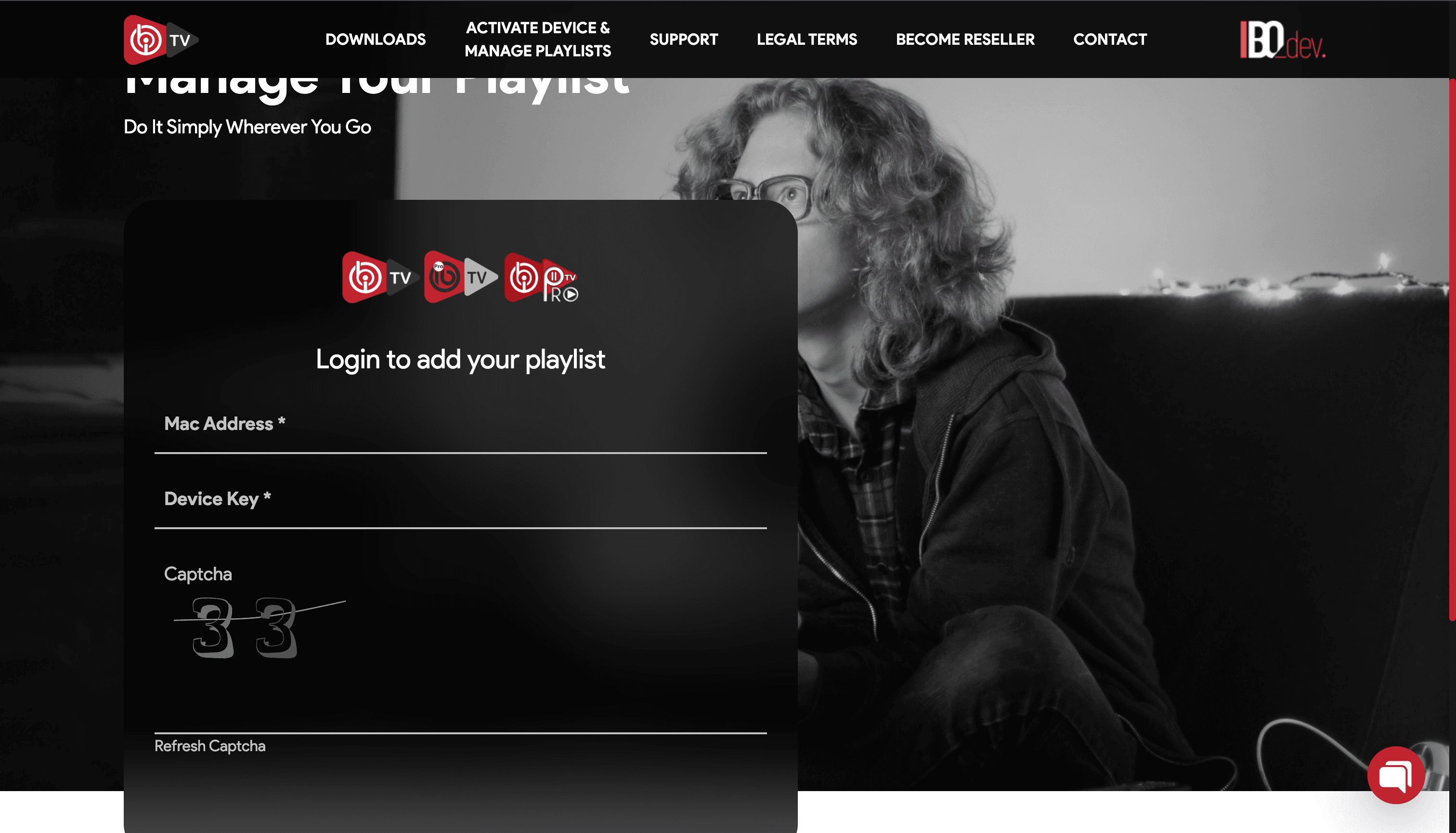
- Launch IBO Player Pro on your Android device. It shows two things you need: a MAC address and a device key.
- From a phone or computer, visit iboplayer.com/device/login, enter both and solve the captcha.
- Click Add playlist, set Playlist name to HoxyTV and put your M3U URL in Playlist URL.
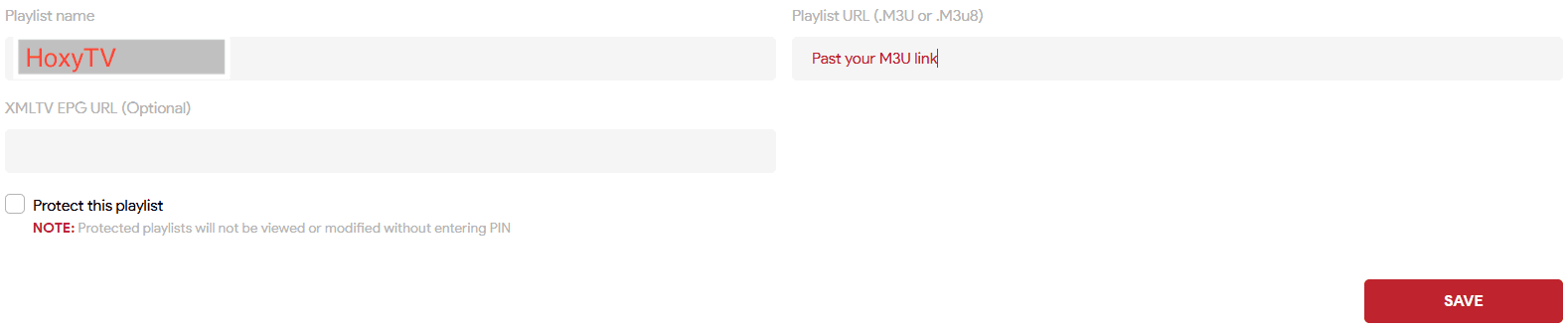
- Click Save, then close and reopen IBO Player Pro on the Android device.
Pro Tips
- Stay on Wi-Fi rather than mobile data for fewer drops.
- If the player has a hardware acceleration setting, switch it on.
- Playing up? Clear the player's cache under Settings > Apps.
You're All Set!
Your Android device now plays HoxyTV. If something is not right, the answers below cover the usual fixes.
Troubleshooting on Android
Android blocks the APK install. What do I change?
Go back to Step 1 and allow installs for the app you downloaded with (often Chrome or Files), then tap the .apk file in Downloads again.
My playlist shows no channels or fails to load. How do I fix it?
Copy the M3U URL from your welcome email again, all of it, and paste it once more. Make sure you logged in with the MAC address on your screen (and for IBO Player Pro, its device key too), then reopen the app. Still empty? Message our support team.
Can I watch on my phone and my TV with one subscription?
Yes. Add your HoxyTV playlist on every device you like; how many of them can play at the same moment depends on the number of connections in your plan.
Don't have HoxyTV yet?
Choose a plan and your login details reach your inbox right after payment: 30,000+ live channels, 100,000+ movies and shows, and setup help day and night.